Pipeline Schema Workarounds
The pipeline schema described on the main Pipeline Schema page
is conceptually correct, but the EasyLink software currently can’t implement it exactly as documented.
For this reason, we’ve modified the pipeline schema actually implemented in subtle ways.
The good news is that these have almost no impact on users running pipelines.
So, if your interactions with EasyLink are all through easylink run, you do not need to understand
the content on this page.
The workarounds described here are, however, important for creating implementations to use in
EasyLink.
Input data provided as a list, not a directory
In the slots section, it says “we currently think of data in terms of files or directories.”
However, there are currently some exceptions to the “files or directories”
description.
The first is that input data that come directly from the user (through an input_data.yaml)
are represented and passed to implementations as lists of file paths.
All of the “datasets” arrows in the schema that come from the original
“Input datasets” node, including within the sub-steps of entity resolution,
follow the “datasets” schema as documented except that
instead of containing a directory of datasets, they contain a list of datasets.
See also the next section, which is closely related to this one.
Input data provided together, rather than separated by type
The pipeline schema diagram shows two nodes for user input: input datasets and known clusters.
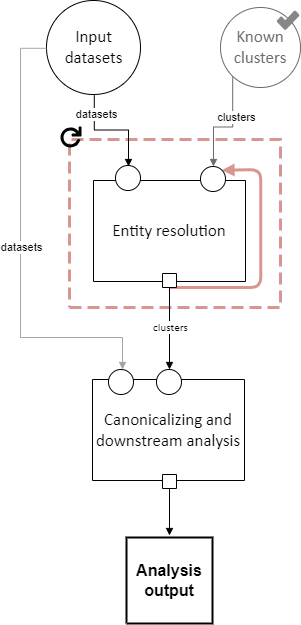
However, EasyLink currently only supports one type (or “slot”) of user input. As a workaround, we essentially merge these two nodes in the diagram. Because, as described in the previous section, multiple user inputs are provided as a list, it is a list of all the input datasets and the known clusters file.
Slots that receive a data dependency from either of these types of user input actually
receive the entire list, including the files not meant for that slot.
The implementation internally must select the relevant file(s) to use.
The rule about how to do this is that the file with a name containing clusters is the known clusters,
and all other files in the list are input datasets.
Cloneable sections do not have splitters
In the diagrams, cloneable sections are shown with splitters, for example in this diagram of the sub-steps of entity resolution:

Here, the “by file” splitter (the triangle at the top of the dashed blue cloneable section) splits a set of datasets into its constituent parts.
EasyLink contains some functionality to achieve this, but it has some limitations [1] and is not currently used. Instead, the implementation is expected to do the splitting, by selecting the relevant file out of what it is given, which is all the files.
It knows which file is the relevant one according to an environment variable
set by the user in their pipeline.yaml.
This is a user-facing change.
The pipeline.yaml section for the cloneable section diagrammed above might look like:
determining_exclusions_and_removing_records:
  clones:
    - determining_exclusions:
        implementation:
          name: default_determining_exclusions
          configuration:
            INPUT_DATASET: input_file_1
      removing_records:
        implementation:
          name: default_removing_records
          configuration:
            INPUT_DATASET: input_file_1
    - determining_exclusions:
        implementation:
          name: default_determining_exclusions
          configuration:
            INPUT_DATASET: input_file_2
      removing_records:
        implementation:
          name: default_removing_records
          configuration:
            INPUT_DATASET: input_file_2
The highlighted lines are where the environment variable is passed which tells the implementation how to select the relevant file. Note that the splitter must be emulated in implementations of both steps, because both steps in the above diagram received the output of the splitter.
It is very important that the user:
Create a number of clones (items in the list under
clones) that matches the number of filesPass each clone the name of one of the files
Pass each sub-step within each clone the same file name
Due to the workaround, none of this is enforced by EasyLink.
Cloneable section aggregators create lists
Eventually, the aggregators (funnel icons) on data dependencies passing out of a cloneable section will create directories. However, they currently create lists of file paths, similar to the first limitation listed on this page about user input data (this is the other place where data dependencies are not files or directories). An implementation whose input comes from a cloneable section’s aggregator will receive a list.
This means that in the following diagram, where eventually the “by file” aggregator will aggregate a set of directories into a single flat directory, it currently will create a list of directory paths (each containing one dataset).