Getting Started
Introduction
EasyLink is a tool that allows users to build and run highly configurable record linkage pipelines. Its configurability enables users to “mix and match” different pieces of record linkage software by ensuring that each piece of the pipeline conforms to standard patterns.
For example, users at the Census Bureau could easily evaluate whether using a more sophisticated “blocking” method would improve results in a certain pipeline, without having to rewrite the entire pipeline.
Overview
This tutorial introduces EasyLink concepts and features by demonstrating the software’s usage. Covered concepts include the EasyLink record linkage “pipeline schema,” EasyLink pipeline configuration, running pipelines, changing record linkage step implementations, changing input data, evaluating and comparing results, and more.
Audience
This tutorial is intended for people familiar with record linkage practices, who are interested in easily comparing linkage results across different methods. This tutorial will not include introductory information about record linkage, though it demonstrates a simple example of it.
Tutorial prerequisites
Install EasyLink if you haven’t already.
The tutorial uses the Splink Python package for record linkage implementations. You do not need to install Splink. Splink knowledge is not required to complete the tutorial but may be helpful when configuring Splink models.
Simulated input data
Our first demonstration of running an EasyLink pipeline will configure a simple, “naive” record linkage model with implementations written using the Splink package. Our pipeline will link two simulated datasets generated by our pseudopeople package: simulated Social Security Administration records and simulated W-2 and 1099 employment tax forms. These datasets are about entirely simulated people, who we call “simulants,” but they contain realistic data, including “noise” such as typos, for an authentic record linkage challenge.
Naive model - running a pipeline
Let’s start by using the easylink run command to run a pipeline that configures a simple
record linkage model.
First we need to download the configuration files we will pass to the command line:
input_data_demo.yaml and pipeline_demo_naive.yaml. Save them into the directory
from which you will execute the easylink run command.
input_data_demo.yaml additionally references a few
input files which we will save as well. Save known_clusters.parquet to the same directory as
the other files, then create a subdirectory called 2020 and save input_file_ssa.parquet and
input_file_w2.parquet into it.
Now we can run the pipeline. Note that if this is your first time running EasyLink, the command will first download the required Singularity container images. These files contain the code EasyLink will run for each step in the record linkage pipeline. The total amount to be downloaded is approximately 5GB, so we recommend first running the command below, then reading the information about it while the files download. Hopefully the download will be complete by the time you reach the next interactive section! The progress of your image downloads will be displayed in the console.
$ easylink run -p pipeline_demo_naive.yaml -i input_data_demo.yaml
 2025-06-30 14:17:58 | 00:00:01 | Running pipeline
 2025-06-30 14:17:58 | 00:00:01 | Results directory: /mnt/share/homes/tylerdy/easylink/docs/source/user_guide/tutorials/results/2025_06_26_10_13_31
 ... Downloading Images ...
 2025-06-30 14:18:21 | 00:00:24 | Running Snakemake
 2025-06-30 14:18:22 | 00:00:25 | Validating determining_exclusions_and_removing_records_clone_2_removing_records_default_removing_records input slot input_datasets
 ...
 2025-06-30 14:18:24 | 00:00:27 | Running clusters_to_links implementation: default_clusters_to_links
 2025-06-30 14:18:24 | 00:00:27 | Running determining_exclusions implementation: default_determining_exclusions
 2025-06-30 14:18:24 | 00:00:27 | Running determining_exclusions implementation: default_determining_exclusions
 ...
 2025-06-30 14:18:39 | 00:00:42 | Validating splink_blocking_and_filtering input slot records
 2025-06-30 14:18:42 | 00:00:45 | Running blocking_and_filtering implementation: splink_blocking_and_filtering
 2025-06-30 14:18:50 | 00:00:53 | Validating splink_evaluating_pairs input slot blocks
 2025-06-30 14:18:53 | 00:00:56 | Running evaluating_pairs implementation: splink_evaluating_pairs
 ...
 2025-06-30 14:19:19 | 00:01:22 | Running canonicalizing_and_downstream_analysis implementation: save_clusters
 2025-06-30 14:19:21 | 00:01:24 | Validating results input slot analysis_output
 2025-06-30 14:19:23 | 00:01:26 | Grabbing final output
 2025-06-30 14:19:26 | 00:01:29 | Pipeline finished running - full log saved to: /mnt/share/homes/tylerdy/easylink/docs/source/user_guide/tutorials/results/2025_06_26_10_13_31/pipeline.log
Success! Our pipeline has linked the input data and outputted the results, the clusters of records it found. We’ll take a look at these results later and see how the model performed.
Naive model - command line arguments
This section will explain the command line arguments and show the file we pass to each one, including the pipeline specification YAML and how it relates to the EasyLink pipeline schema. That file can look a little complicated at first, so feel free to skip ahead to the Naive model - results section, where the interactive part of the tutorial continues, and come back later.
Input data
The --input-data (-i) argument to easylink run accepts a YAML file specifying a list
of paths to files or directories containing input data to be used by the pipeline.
We passed input_data_demo.yaml, the contents of which are shown below:
input_file_ssa: 2020/input_file_ssa.parquet
input_file_w2: 2020/input_file_w2.parquet
known_clusters: known_clusters.parquet
Here we have defined the locations of the three input files we will use: the 2020 versions of the
two pseudopeople datasets, and an empty known_clusters file, since no
clusters are known to us before running this pipeline.
Note
To meet the input specifications for Datasets defined by the pipeline schema (see the next section),
the SSA and W2 datasets, after being generated by pseudopeople, were modified
to add the required Record ID column. Separately, for data cleaning rather than specification reasons,
SSA death records were removed, leaving only SSN creation records.
Pipeline specification
The --pipeline-specification (-p) argument to easylink run accepts a YAML file specifying
the implementations and other configuration options for the pipeline being run. We passed
pipeline_demo_naive.yaml, the contents of which can be seen by clicking below:
Show pipeline_demo_naive.yaml
  steps:
    entity_resolution:
      substeps:
        determining_exclusions_and_removing_records:
          clones:
            - determining_exclusions:
                implementation:
                  name: default_determining_exclusions
                  configuration:
                    INPUT_DATASET: input_file_ssa
              removing_records:
                implementation:
                  name: default_removing_records
                  configuration:
                    INPUT_DATASET: input_file_ssa
            - determining_exclusions:
                implementation:
                  name: default_determining_exclusions
                  configuration:
                    INPUT_DATASET: input_file_w2
              removing_records:
                implementation:
                  name: default_removing_records
                  configuration:
                    INPUT_DATASET: input_file_w2
        clustering:
          substeps:
            clusters_to_links:
              implementation:
                name: default_clusters_to_links
            linking:
              substeps:
                pre-processing:
                  clones:
                    - implementation:
                        name: middle_name_to_initial
                        configuration:
                          INPUT_DATASET: input_file_ssa
                    - implementation:
                        name: no_pre-processing
                        configuration:
                          INPUT_DATASET: input_file_w2
                schema_alignment:
                  implementation:
                    name: default_schema_alignment
                blocking_and_filtering:
                  implementation:
                    name: splink_blocking_and_filtering
                    configuration:
                      LINK_ONLY: true
                      BLOCKING_RULES: "l.first_name == r.first_name,l.last_name == r.last_name"
                evaluating_pairs:
                  implementation:
                    name: splink_evaluating_pairs
                    configuration:
                      LINK_ONLY: true
                      BLOCKING_RULES_FOR_TRAINING: "l.first_name == r.first_name,l.last_name == r.last_name"
                      COMPARISONS: "ssn:exact,first_name:exact,middle_initial:exact,last_name:exact"
                      PROBABILITY_TWO_RANDOM_RECORDS_MATCH: 0.0001  # == 1 / len(w2)
            links_to_clusters:
              implementation:
                name: one_to_many_links_to_clusters
                configuration:
                  NO_DUPLICATES_DATASET: input_file_ssa
                  THRESHOLD_MATCH_PROBABILITY: 0.996
        updating_clusters:
          implementation:
            name: default_updating_clusters
    canonicalizing_and_downstream_analysis:
      implementation:
        name: save_clusters
The pipeline specification follows the structure defined in the Pipeline Schema, a very important part of EasyLink. The EasyLink pipeline schema enforces the standard patterns that implementations of each step in the linkage process must follow. These standard patterns enable easy configuration and swapping.
There are some flexible sections in the pipeline schema, such as cloneable sections, which allow a pipeline to create multiple copies of that section and use different implementations or inputs for each copy. We’ll see one of those soon.
Important
Before proceeding, it’s important to understand the relationship between a pipeline, a pipeline specification (YAML file), and the pipeline schema:
A pipeline consists of a complete set of software which can perform a whole record linkage task, taking in record datasets as inputs and outputting a result such as clusters of records or some analysis on those clusters. EasyLink makes it simple to define and run many different pipelines in order to experiment with what methods yield the best results for a task.
A pipeline specification is a YAML file, which defines a pipeline which can be run with EasyLink. The schema defines the implementation which will be run for each step, and performs any necessary configuration for those implementations. An example specification is expandable above.
The EasyLink Pipeline Schema defines the universe of pipelines that can be constructed using EasyLink, including steps, inputs and outputs, and operators, as described above. All pipelines must adhere to the pipeline schema and implement all its steps!
Top-level steps
Let’s take a closer look at the pipeline specification YAML bit by bit. We’ll start at the top level.
steps:
  entity_resolution:
    substeps:
      ...
  canonicalizing_and_downstream_analysis:
    implementation:
      name: save_clusters
This code block shows the same file, but with all the substeps of entity_resolution hidden,
like in this diagram
of the pipeline schema. Each time we link to one of these diagrams, the text below will also describe what
each of the substeps involved does.
The children of the steps key are the top-level steps in the pipeline - as you can see, there are
only two. We can see our first example of a step being configured if we look at canonicalizing_and_downstream_analysis.
The children of the implementation key define and configure the code we will run for
the canonicalizing and downstream analysis step.
This step is intended to be used for determining best representative (“canonical”) records for each cluster, and/or
doing some kind of summary data analysis (such as a linear regression) within EasyLink.
In this case, we won’t do either of these things, and simply save the resolved clusters with no additional processing.
We use the name key to choose the save_clusters implementation of canonicalization_and_downstream_analysis.
save_clusters corresponds to one of the images which was downloaded the first time you ran the pipeline.
Entity resolution substeps
Next we will show the ellipsed part of the above code block, which corresponds to this diagram in the pipeline schema.
determining_exclusions_and_removing_records:
  clones:
    - determining_exclusions:
        implementation:
          name: default_determining_exclusions
          configuration:
            INPUT_DATASET: input_file_ssa
      removing_records:
        implementation:
          name: default_removing_records
          configuration:
            INPUT_DATASET: input_file_ssa
    - determining_exclusions:
        implementation:
          name: default_determining_exclusions
          configuration:
            INPUT_DATASET: input_file_w2
      removing_records:
        implementation:
          name: default_removing_records
          configuration:
            INPUT_DATASET: input_file_w2
clustering:
  substeps:
    ...
updating_clusters:
  implementation:
    name: default_updating_clusters
The last step shown, updating_clusters, looks similar to canonicalization_and_downstream_analysis above; it simply chooses
an implementation for the step using the name key.
The substeps of clustering are hidden – we’ll look at them next.
The complicated part is determining_exclusions_and_removing_records and its clones key:
As described in the pipeline schema, the steps “determining exclusions and removing records” identify and remove records that can be excluded from this linking pass to save computational time, generally because they have already been assigned to clusters.
The schema can define cloneable sections, which allow a pipeline to create
multiple copies of that section and use different implementations or inputs
for each copy. We can see that the entity resolution sub-steps schema section defines
determining_exclusions and removing_records as cloneable in the diagram
(blue dashed box).
In the YAML, the cloneable superstep determining_exclusions_and_removing_records is expanded
using the clones key, and two copies are made of its substeps,
determining_exclusions and removing_records. The - denotes the beginning
of an item in a YAML collection.
We can see that the only difference between the two copies is what filename is passed
to the INPUT_DATASET configuration key for each step. In
the first copy, the ssa dataset files are used as inputs for both steps,
while in the second copy, the w2 dataset files are the inputs. In practice,
this means that records to exclude will be identified and removed separately for
each input file, as required by the schema since each input file has different data.
This cloneable section also allows different implementations to be used for each dataset
if desired.
Note
All the steps listed here use default implementations.
Much of the time, steps with default implementations aren’t very interesting to change,
and the defaults will do whatever operation is the common or simple case.
The pipeline schema section linked above the code block describes the behavior
of each of these default implementations.
Clustering substeps
Next we will show the ellipsed part of the above code block, which corresponds to this diagram in the pipeline schema.
clusters_to_links:
  implementation:
    name: default_clusters_to_links
linking:
  substeps:
    ...
links_to_clusters:
  implementation:
    name: one_to_many_links_to_clusters
    configuration:
      DUPLICATE_FREE_DATASET: input_file_ssa
      THRESHOLD_MATCH_PROBABILITY: 0.996
We will show the hidden linking substeps in the next section.
In links_to_clusters we see a more interesting example of configuring an implementation.
DUPLICATE_FREE_DATASET specifies which dataset is assumed not to contain duplicates within it.
THRESHOLD_MATCH_PROBABILITY here allows the user to define at what probability a pair of records
will be considered part of the same cluster.
Our one_to_many_links_to_clusters implementation implements this step by filtering out links
below the threshold, and then choosing the single best-matching SSA record for each
W-2 record (since linking a W-2 to multiple SSA records would imply those SSA records were duplicates).
The name of the implementation reflects that in the resulting clusters, one SSA record can have many
W-2 records (but not vice versa).
While this implementation doesn’t use the Splink package, the Splink docs have helpful info on how to choose a probability threshold.
Linking substeps
Next we will show the ellipsed part of the above code block, which corresponds to this diagram in the pipeline schema.
pre-processing:
  clones:
    - implementation:
        name: middle_name_to_initial
        configuration:
          INPUT_DATASET: input_file_ssa
    - implementation:
        name: no_pre-processing
        configuration:
          INPUT_DATASET: input_file_w2
schema_alignment:
  implementation:
    name: default_schema_alignment
blocking_and_filtering:
  implementation:
    name: splink_blocking_and_filtering
    configuration:
      LINK_ONLY: true
      BLOCKING_RULES: "l.first_name == r.first_name,l.last_name == r.last_name"
evaluating_pairs:
  implementation:
    name: splink_evaluating_pairs
    configuration:
      LINK_ONLY: true
      BLOCKING_RULES_FOR_TRAINING: "l.first_name == r.first_name,l.last_name == r.last_name"
      COMPARISONS: "ssn:exact,first_name:exact,middle_initial:exact,last_name:exact"
      PROBABILITY_TWO_RANDOM_RECORDS_MATCH: 0.0001  # == 1 / len(w2)
We see that pre-processing is another cloneable step, allowing us to select different pre-processing implementations for different
input datasets. In this case, we leave the w2 dataset unchanged, while changing the middle_name column in the ssa dataset
to a middle_initial column to match the w2 data.
Finally, we will configure the two Splink implementations.
For splink_blocking_and_filtering, we set:
LINK_ONLY: true
BLOCKING_RULES: "l.first_name == r.first_name,l.last_name == r.last_name"
The first variable instructs Splink to link records between datasets without de-depulicating within datasets. The second is used by the Splink implementation to define which pairs of records will be considered as possible matches (only records with matching first or last names).
For splink_evaluating_pairs, we set:
LINK_ONLY: true
BLOCKING_RULES_FOR_TRAINING: "l.first_name == r.first_name,l.last_name == r.last_name"
COMPARISONS: "ssn:exact,first_name:exact,middle_initial:exact,last_name:exact"
PROBABILITY_TWO_RANDOM_RECORDS_MATCH: 0.0001  # == 1 / len(w2)
The first two variables are used similarly to the previous implementation.
BLOCKING_RULES_FOR_TRAINING is specifically used for estimating parameters in the model.
COMPARISONS
defines the columns which will be compared by the Splink model, and how Splink will evaluate
whether the column values match (exact comparisons). The fourth is a parameter used in training
the model and making predictions
(see the Splink docs for more info).
And that’s the whole pipeline specification for our naive Splink model! Next let’s take a look at the results from when we ran the pipeline earlier.
Naive model - results
Input and output data is stored in Parquet files. For example, to see our original records,
we can view the contents of the input files listed in input_data_demo.yaml using Python:
$ # Activate your EasyLink conda environment!
$ python
>>> import pandas as pd
>>> pd.read_parquet("2020/input_file_ssa.parquet")
      simulant_id          ssn first_name    middle_name  ...     sex event_type event_date Record ID
0         0_19979  786-77-6454     Evelyn  Granddaughter  ...  Female   creation   19191204         0
1          0_6846  688-88-6377     George         Robert  ...    Male   creation   19210616         1
2         0_19983  651-33-9561   Beatrice         Jennie  ...  Female   creation   19220113         2
3           0_262  665-25-7858       Eura         Nadine  ...  Female   creation   19220305         3
4         0_12473  875-10-2359    Roberta           Ruth  ...  Female   creation   19220306         4
...           ...          ...        ...            ...  ...     ...        ...        ...       ...
16492     0_20687  183-90-0619    Matthew        Michael  ...  Female   creation   20201229     16492
16493     0_20686  803-81-8527     Jermey          Tyler  ...    Male   creation   20201229     16493
16494     0_20692  170-62-5253  Brittanie         Lauren  ...  Female   creation   20201229     16494
16495     0_20662  281-88-9330     Marcus         Jasper  ...    Male   creation   20201230     16495
16496     0_20673  547-99-7034     Analia        Brielle  ...  Female   creation   20201231     16496
[15984 rows x 10 columns]

>>> pd.read_parquet("2020/input_file_w2.parquet")
    simulant_id household_id employer_id          ssn  ... mailing_address_zipcode tax_form tax_year Record ID
0            0_4          0_8          95  584-16-0130  ...                   00000       W2     2020         0
1            0_5          0_8          29  854-13-6295  ...                   00000       W2     2020         1
2            0_5          0_8          30  854-13-6295  ...                   00000       W2     2020         2
3         0_5621       0_2289          46  674-27-1745  ...                   00000       W2     2020         3
4         0_5623       0_2289          83  794-23-1522  ...                   00000       W2     2020         4
...          ...          ...         ...          ...  ...                     ...      ...      ...       ...
9898     0_18936       0_7621          23  006-92-7857  ...                   00000       W2     2020      9898
9899     0_18936       0_7621          90  006-92-7857  ...                   00000       W2     2020      9899
9900     0_18937       0_7621           1  182-82-5017  ...                   00000     1099     2020      9900
9901     0_18937       0_7621         105  182-82-5017  ...                   00000     1099     2020      9901
9902     0_18939       0_7621           9  283-97-5940  ...                   00000       W2     2020      9902
[9903 rows x 25 columns]

>>> pd.read_parquet("known_clusters.parquet")
Empty DataFrame
Columns: [Input Record Dataset, Input Record ID, Cluster ID]
Index: []
It can also be useful to set up an alias to more easily preview parquet files.
Run the following line to do so.
(If you want this alias to persist across terminal restarts, you can add it to your .bashrc or .bash_aliases in your home directory.)
pqprint() { python -c "import pandas as pd; print(pd.read_parquet('$1'))" ; }
Let’s use the alias to print the results parquet, the location of which was printed when we ran the pipeline.
$ pqprint results/2025_06_26_10_13_31/result.parquet
      Input Record Dataset  Input Record ID  Cluster ID
0           input_file_ssa             7371           1
1            input_file_w2                0           1
2           input_file_ssa             7037           2
3            input_file_w2                2           2
4            input_file_w2                1           2
...                    ...              ...         ...
15810        input_file_w2              997        6693
15811       input_file_ssa             5883        6693
15812        input_file_w2              999        6694
15813       input_file_ssa             6358        6694
15814        input_file_w2              998        6694

[15815 rows x 3 columns]
As we can see, the pipeline has successfully outputted a Cluster ID for every
input record it was able to link to another record for our probability threshold
of 99.6%.
Note
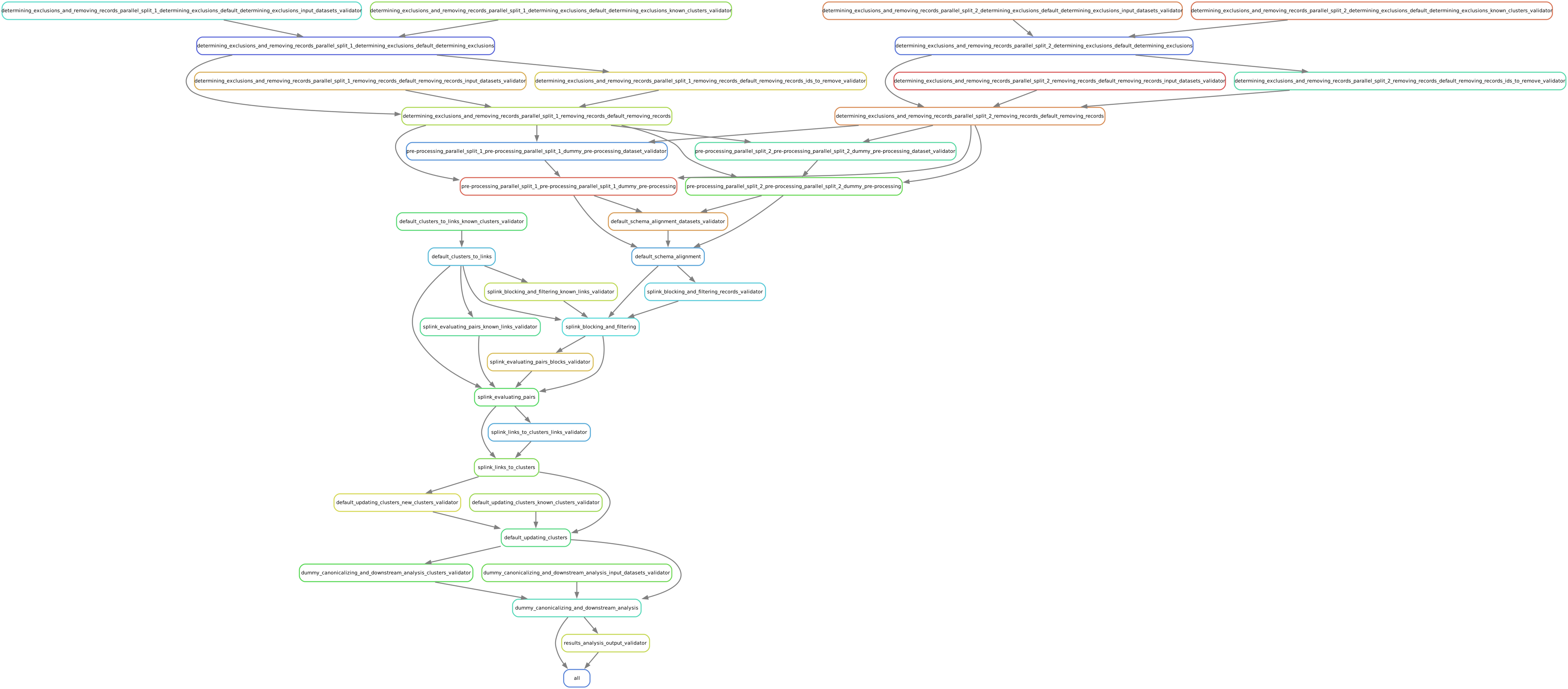
Running the pipeline also generates a DAG.svg file in
the results directory which shows the implementations, data dependencies and
input validations present in the pipeline. Due to the large number of steps, the figure is
not very readable when embedded in this page, but can be opened in a new tab to allow for
zooming in.
To see how the model linked pairs of records before resolving them into clusters, we can
look at the intermediate output produced by the splink_evaluating_pairs
implementation:
$ pqprint results/2025_06_26_10_13_31/intermediate/splink_evaluating_pairs/result.parquet
      Left Record Dataset  Left Record ID Right Record Dataset  Right Record ID   Probability
0           input_file_ssa           16314        input_file_w2             7604  5.593631e-06
1           input_file_ssa           16318        input_file_w2             7604  5.593631e-06
2           input_file_ssa           16326        input_file_w2             6049  5.593631e-06
3           input_file_ssa           16351        input_file_w2             3549  5.593631e-06
4           input_file_ssa           16353        input_file_w2             7434  5.593631e-06
...                    ...             ...                  ...              ...           ...
515790      input_file_ssa            8586        input_file_w2              943  3.526073e-04
515791      input_file_ssa            8591        input_file_w2             3326  7.227902e-07
515792      input_file_ssa            8595        input_file_w2             3369  7.227902e-07
515793      input_file_ssa            8596        input_file_w2             6458  3.526073e-04
515794      input_file_ssa            8597        input_file_w2             3248  7.227902e-07

[515795 rows x 5 columns]
The record pairs displayed in the preview are all far below the match threshold, but the full results could
be investigated further using pandas.read_parquet() in a Python session.
The Splink implementations in our pipeline also produce some diagnostic charts which can be useful
for evaluating results, such as the match weights chart
(Splink docs) and
comparison viewer tool
(Splink docs).
These charts are from the
diagnostics/splink_evaluating_pairs subdirectory of the results directory for each pipeline run.
Finally, since we are using simulated input datasets, and therefore know the ground truth of
which records are truly links, we can directly see how our naive model performed with the help of
a script to evaluate false positives and false negatives, print_fp_fn_w2_ssa.py.
Download and run it:
$ python print_fp_fn_w2_ssa.py results/2025_06_26_10_13_31
12509 true links
len(false_positives)=31; len(false_negatives)=555
In other words, with a threshold probability of 99.6%, out of 12,509 true links to be found, our model missed 555 (false negatives), and additionally linked 31 pairs that shouldn’t have been linked (false positives).
Depending on our goals with the linked data, we might decrease the threshold to reduce false negatives, at the cost of increased false positives. But this was a simple linkage model. Let’s improve it to see if we can get a better performance tradeoff!
Configuring an improved pipeline
Next, let’s modify our naive pipeline configuration YAML to try to improve our results. Primarily, we
will change the COMPARISONS we pass to splink_evaluating_pairs to use flexible comparison
methods rather than exact matches, allowing us to link records which have typos or other noise in them. We’ll
use a new pipeline configuration YAML, pipeline_demo_improved.yaml, with these changes.
In splink_evaluating_pairs, we make the following change:
   LINK_ONLY: true
   BLOCKING_RULES_FOR_TRAINING: "'l.first_name == r.first_name,l.last_name == r.last_name'"
-  COMPARISONS: "ssn:exact,first_name:exact,middle_initial:exact,last_name:exact"
+  COMPARISONS: "ssn:levenshtein,first_name:name,middle_initial:exact,last_name:name"
   PROBABILITY_TWO_RANDOM_RECORDS_MATCH: 0.0001  # == 1 / len(w2)
COMPARISONS now uses
Levenshtein
comparisons for ssn, and
Name
comparisons for first_name and last_name, to link similar but not identical SSNs and names.
By re-running the pipeline with these changes and then running the evauation script, we can see how our results compare:
$ easylink run -p pipeline_demo_improved.yaml -i input_data_demo.yaml
$ python print_fp_fn_w2_ssa.py results/2025_06_26_11_08_57
12509 true links
len(false_positives)=34; len(false_negatives)=488
We eliminated 67 false negatives compared to the naive results, thanks to our model linking more records with columns that are similar but don’t exactly match. At the cost of only three additional false positives, this seems like a good improvement!
Linking 2030 datasets using improved pipeline
Let’s run this same “improved” pipeline, but using input_data_demo_2030.yaml
as the input YAML, which uses the SSA and W-2 datasets from 2030 rather than 2020.
Like we did for 2020, we’ll create a 2030 directory and save input_file_ssa.parquet and
input_file_w2.parquet into it.
We can run the same pipeline on different data by changing only the input parameter:
$ easylink run -p pipeline_demo_improved.yaml -i input_data_demo_2030.yaml
$ python print_fp_fn_w2_ssa.py results/2025_06_26_11_17_52
13888 true links
len(false_positives)=33; len(false_negatives)=547
We get similar, but not identical, results with the 2030 data.
Linking with an iterative “cascade”
Cascading is an iterative approach to entity resolution used by the US Census Bureau (and possibly other organizations too) to deal with the computational challenge of linking billions of records. In cascading, multiple passes are made to find clusters, starting with faster techniques (such as exact matching) that can solve some “easy” cases and make the problem smaller. As the focus narrows to only the records that are hardest to cluster, making the size of the problem smaller, more sophisticated and computationally expensive techniques can be used.
Cascading isn’t found very often in the scientific literature, and its statistical properties are under-theorized.
Cascading depends on having some way to determine, from an initial/provisional linkage result, which records are “done” and do not need to be considered any longer. In our case, because we know (or are willing to assume) that there are no duplicates in the SSA dataset, that means that any W-2 record that has already linked to one SSA record has found its only match and does not need to be compared against any more SSA records.
Cascading can involve any number of iterative “passes,” but for simplicity we will consider only two. In the first pass, we’ll use deterministic linkage, linking records that match exactly on SSN, first name, and last name. In the second pass, we’ll use our improved Splink model on the remaining records.
We don’t expect cascading to make our results any more accurate – in fact, it seems likely that doing things in two steps might lead to a few more mistakes. Since cascading is a computational optimization, let’s get a baseline of how much computation we are doing without it: how many pairs we evaluated with the improved Splink model. For this model, we’ll return to 2020 data, so you’ll want to go back and find the timestamp of the last model before you ran on 2030 data:
$ pqprint results/2025_06_26_10_13_31/intermediate/splink_evaluating_pairs/result.parquet
      Left Record Dataset  Left Record ID Right Record Dataset  Right Record ID   Probability
0           input_file_ssa           16314        input_file_w2             7604  5.593631e-06
1           input_file_ssa           16318        input_file_w2             7604  5.593631e-06
2           input_file_ssa           16326        input_file_w2             6049  5.593631e-06
3           input_file_ssa           16351        input_file_w2             3549  5.593631e-06
4           input_file_ssa           16353        input_file_w2             7434  5.593631e-06
...                    ...             ...                  ...              ...           ...
515790      input_file_ssa            8586        input_file_w2              943  3.526073e-04
515791      input_file_ssa            8591        input_file_w2             3326  7.227902e-07
515792      input_file_ssa            8595        input_file_w2             3369  7.227902e-07
515793      input_file_ssa            8596        input_file_w2             6458  3.526073e-04
515794      input_file_ssa            8597        input_file_w2             3248  7.227902e-07

[515795 rows x 5 columns]
We ran over half a million pairs of records through our Splink model. Let’s see if cascading can decrease this number.
We’ll add cascading to our pipeline specification by giving the entity_resolution step multiple
iterations.
entity_resolution is what’s called a “loop-able section”, which works
similarly to a cloneable section.
The main difference in syntax is that the iterations key is used instead of clones.
When the pipeline is run, rather than running in parallel like clones, these iterations will be executed
in order, with the output from one iteration being passed as input to the next.
steps:
  entity_resolution:
    iterations:
      - substeps:
          ...
      - substeps:
          ...
  canonicalizing_and_downstream_analysis:
    implementation:
      name: save_clusters
Within the first ellipsed substeps section (the specification for our first cascading pass)
we will copy the entire substeps section from our improved model, but make some changes to
make the linkage deterministic:
substeps:
  determining_exclusions_and_removing_records:
    clones:
      - determining_exclusions:
          implementation:
            name: default_determining_exclusions
            configuration:
              INPUT_DATASET: input_file_ssa
        removing_records:
          implementation:
            name: default_removing_records
            configuration:
              INPUT_DATASET: input_file_ssa
      - determining_exclusions:
         implementation:
            name: default_determining_exclusions
            configuration:
              INPUT_DATASET: input_file_w2
        removing_records:
          implementation:
            name: default_removing_records
            configuration:
              INPUT_DATASET: input_file_w2
  clustering:
    substeps:
      clusters_to_links:
        implementation:
          name: default_clusters_to_links
      linking:
        substeps:
          pre-processing:
            clones:
            - implementation:
-               name: middle_name_to_initial
+               name: no_pre-processing
                configuration:
                  INPUT_DATASET: input_file_ssa
            - implementation:
                name: no_pre-processing
                configuration:
                  INPUT_DATASET: input_file_w2
          schema_alignment:
            implementation:
              name: default_schema_alignment
          blocking_and_filtering:
            implementation:
              name: splink_blocking_and_filtering
              configuration:
                LINK_ONLY: true
-               BLOCKING_RULES: "l.first_name == r.first_name,l.last_name == r.last_name"
+               BLOCKING_RULES: "l.ssn == r.ssn and l.first_name == r.first_name and l.last_name == r.last_name"
          evaluating_pairs:
            implementation:
-             name: splink_evaluating_pairs
-               configuration:
-                 LINK_ONLY: true
-                 BLOCKING_RULES_FOR_TRAINING: "l.first_name == r.first_name,l.last_name == r.last_name"
-                 COMPARISONS: "ssn:levenshtein,first_name:name,middle_initial:exact,last_name:name"
-                 PROBABILITY_TWO_RANDOM_RECORDS_MATCH: 0.0001  # == 1 / len(w2)
+             name: accept_all_pairs
      links_to_clusters:
        implementation:
          name: one_to_many_links_to_clusters
          configuration:
            NO_DUPLICATES_DATASET: input_file_ssa
-           THRESHOLD_MATCH_PROBABILITY: 0.996
+           # All come with certainty from accept_all_pairs anyway, so this doesn't matter
+           THRESHOLD_MATCH_PROBABILITY: 0.9
To do our strict deterministic linkage, we change our BLOCKING_RULES to contain just one
rule, for our determinstic linkage rule (exact match on SSN, first name, and last name).
Then we replace our Splink evaluating-pairs model with an implementation called accept_all_pairs
which, as the name suggests, accepts every pair that passes blocking as a match with probability 1.
For the second iteration, we can paste in another copy of our original improved model, with the following changes:
substeps:
  determining_exclusions_and_removing_records:
    clones:
      - determining_exclusions:
          implementation:
-           name: default_determining_exclusions
+           name: exclude_none
            configuration:
              INPUT_DATASET: input_file_ssa
        removing_records:
          implementation:
            name: default_removing_records
            configuration:
              INPUT_DATASET: input_file_ssa
      - determining_exclusions:
         implementation:
-           name: default_determining_exclusions
+           name: exclude_clustered
            configuration:
              INPUT_DATASET: input_file_w2
        removing_records:
          implementation:
            name: default_removing_records
            configuration:
              INPUT_DATASET: input_file_w2
  clustering:
    substeps:
      clusters_to_links:
        implementation:
          name: default_clusters_to_links
      linking:
        substeps:
          pre-processing:
            clones:
            - implementation:
                name: middle_name_to_initial
                configuration:
                  INPUT_DATASET: input_file_ssa
            - implementation:
                name: no_pre-processing
                configuration:
                  INPUT_DATASET: input_file_w2
          schema_alignment:
            implementation:
              name: default_schema_alignment
          blocking_and_filtering:
            implementation:
              name: splink_blocking_and_filtering
              configuration:
                LINK_ONLY: true
                BLOCKING_RULES: "l.first_name == r.first_name,l.last_name == r.last_name"
          evaluating_pairs:
            implementation:
              name: splink_evaluating_pairs
                configuration:
                  LINK_ONLY: true
                  BLOCKING_RULES_FOR_TRAINING: "l.first_name == r.first_name,l.last_name == r.last_name"
                  COMPARISONS: "ssn:levenshtein,first_name:name,middle_initial:exact,last_name:name"
                  PROBABILITY_TWO_RANDOM_RECORDS_MATCH: 0.0001  # == 1 / len(w2)
      links_to_clusters:
        implementation:
          name: one_to_many_links_to_clusters
          configuration:
            NO_DUPLICATES_DATASET: input_file_ssa
            THRESHOLD_MATCH_PROBABILITY: 0.996
The only difference here is that we use new implementations for determining_exclusions.
The determining exclusions step exists in order to facilitate cascading,
but the default implementation (default_determining_exclusions) implements the simplest
case: no cascading.
If it is used for anything other than the first cascade pass, it will throw an error.
In its place, we’ve used exclude_none for SSA, which as the name suggests, does not exclude
any records (since all SSA records remain eligible to match regardless of what is found in the first cascade pass).
exclude_clustered, which we use for W-2, excludes records that have already been clustered with
any other records; so this implements the rule described above, that we can drop W-2 records that have
already linked to an SSA record.
All SSA records remain eligible, while some W-2 records are excluded,
because there can be duplicate W-2 records for the same SSA record, but not the other way around.
The full pipeline specification YAML resulting from these changes is pipeline_demo_improved_cascade.yaml.
Now we’re ready to run the cascading pipeline on the 2020 data and check our accuracy results!
$ easylink run -p pipeline_demo_improved_cascade.yaml -i input_data_demo.yaml -e environment_local.yaml
$ python print_fp_fn_w2_ssa.py results/2025_06_26_11_32_15
12509 true links
len(false_positives)=47; len(false_negatives)=505
As we guessed, accuracy didn’t get better; it actually got a bit worse. We had 13 more false positives than the base improved model on 2020 data, and 17 more false negatives as well. When we look at how many pairs we evaluated though, we see the benefits:
$ pqprint results/2025_06_26_11_32_15/intermediate/entity_resolution_loop_2_clustering_linking_linking_evaluating_pairs_splink_evaluating_pairs/result.parquet
      Left Record Dataset  Left Record ID Right Record Dataset  Right Record ID  Probability
0          input_file_ssa               0        input_file_w2             9815     0.000759
1          input_file_ssa               1        input_file_w2             8608     0.000403
2          input_file_ssa               5        input_file_w2             9177     0.000202
3          input_file_ssa               6        input_file_w2             6195     0.001840
4          input_file_ssa               7        input_file_w2             9177     0.000202
...                   ...             ...                  ...              ...          ...
91420      input_file_ssa           16156        input_file_w2              466     0.000037
91421      input_file_ssa           16244        input_file_w2              466     0.000037
91422      input_file_ssa           16270        input_file_w2              466     0.000037
91423      input_file_ssa           16353        input_file_w2              466     0.000037
91424      input_file_ssa           16421        input_file_w2              466     0.000037

[91425 rows x 5 columns]
We evaluated only 17.7% as many pairs with our complex Splink model as when we weren’t using cascading! Clearly, the first pass with deterministic linkage is quite effective in reducing the size of the problem. Though there is no noticeable runtime speedup with these small data, this difference could be enormous for large data, where evaluating pairs becomes the bottleneck.
Wrapping Up
In this tutorial, we’ve introduced EasyLink and demonstrated how to configure and run EasyLink pipelines, change step implementations, change input data, and evaluate and compare results between pipelines.
Not everything EasyLink can do has been covered in this tutorial. EasyLink currently includes a few more implementations we haven’t used here, can run pipelines on a computational cluster managed by Slurm or distribute work using Apache Spark, and has additional flexibility in the pipeline schema that we haven’t demonstrated here.
In its current state, EasyLink provides only one or two implementations for each step, does not yet have documentation to support users in creating their own implementations, and is not yet stable enough to be recommended as a tool for production pipelines. However, interested users are encouraged to utilize the provided implementations to their full potential by creating more pipelines, changing how implementations are configured, and linking different datasets.
We hope to be able to add more features in the future, including:
Full suite of implementations reflecting a range of common record linkage techniques
Documentation supporting users in creating their own implementations
User-experience improvements, especially regarding writing pipeline specifications and implementations
Auto-parallel sections for processing large scale data